

No products in the cart.
SoundCloud Cover Art Size 2026: Specs, Tips & Best Practices
17
May
May
What Is the SoundCloud Cover Art Size?
If you upload music to SoundCloud, your cover art is one of the first things listeners see — and getting the size right is essential for a professional presentation. Whether you’re uploading a track, EP, or album, SoundCloud has specific image requirements that your artwork must meet before it can be published.
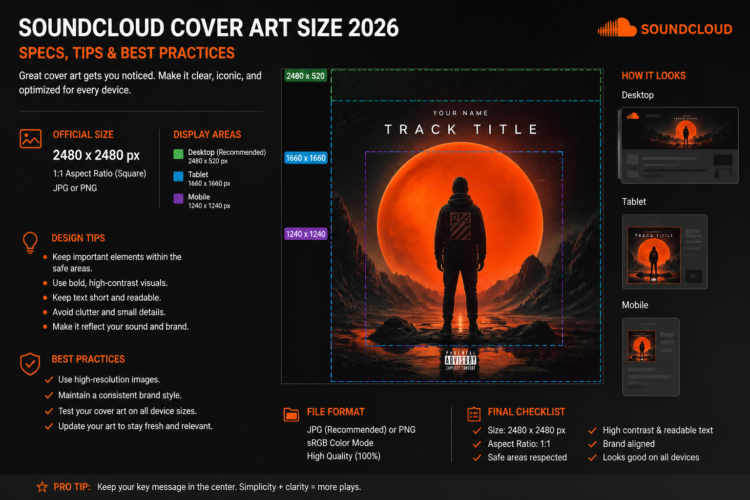
The minimum SoundCloud cover art size is 800 x 800 pixels, with a 1:1 square aspect ratio. However, for the sharpest results across all devices and screen sizes, uploading at 3000 x 3000 pixels is strongly recommended.
SoundCloud Cover Art Requirements (2026)
Here is the complete list of SoundCloud cover art specifications for 2026:
- Minimum Dimensions: 800 x 800 pixels
- Recommended Dimensions: 3000 x 3000 pixels
- Aspect Ratio: 1:1 (perfect square)
- File Format: JPEG or PNG
- Color Mode: RGB
- Maximum File Size: No specific limit, but keep it under 10 MB for smooth uploads
- No offensive or explicit imagery unless your account is flagged appropriately
- No third-party platform logos visible in the artwork
According to SoundCloud’s official help documentation, artwork uploaded below the minimum resolution may appear blurry or may not display correctly across different devices and players.
Why You Should Upload at 3000 x 3000 Pixels
Although SoundCloud’s minimum is 800 x 800 pixels, this is a bare minimum — not a recommendation. In 2026, listeners access SoundCloud on retina screens, 4K monitors, and large tablet displays where low-resolution artwork appears noticeably blurry.
Uploading at 3000 x 3000 pixels ensures your SoundCloud cover art looks sharp at every display size — from the tiny 40px thumbnail in the mobile app to the large header image on your artist profile page. It also future-proofs your release if SoundCloud increases its display resolution standards.
SoundCloud Track Art vs. Profile Image vs. Header Image
SoundCloud uses three types of images for your profile and releases, each with different size requirements:
- Track/Playlist Cover Art: Minimum 800 x 800 px (recommended: 3000 x 3000 px), 1:1 square
- Profile Avatar: Minimum 400 x 400 px, displayed as a circle
- Header Image (Banner): Recommended 2480 x 520 px (widescreen, not square)
This article focuses on track and playlist cover art — the square image attached to individual releases — which is the most critical image for your music’s presentation in feeds, search results, and playlists.
Common SoundCloud Cover Art Mistakes
Independent artists frequently make these errors when uploading to SoundCloud. Avoid these mistakes to keep your profile looking professional:
- Uploading at exactly 800 x 800 px — the minimum is too small for high-DPI displays. Always go higher
- Using a non-square image — SoundCloud will crop or distort non-square artwork, breaking your design
- PNG files with transparent backgrounds — transparency renders as black or white depending on the player
- Saving in CMYK color mode — always use RGB for digital publishing
- Low-quality compressed JPEG — use quality 90% or higher when saving as JPEG
SoundCloud Cover Art Size vs. Other Platforms
Understanding how SoundCloud compares to other major platforms helps you design one master file that works everywhere:
- SoundCloud: 800 x 800 px minimum (3000 recommended)
- Spotify: 3000 x 3000 px recommended
- Apple Music: 4000 x 4000 px recommended
- Tidal: 1600 x 1600 px minimum
- DistroKid: 3000 x 3000 px minimum
If you design your artwork at 4000 x 4000 pixels, it will meet SoundCloud’s requirements — and every other platform’s as well. See our complete Album Cover Size Guide for all platforms for a full comparison.
How to Upload Cover Art on SoundCloud
Uploading your cover art on SoundCloud is straightforward:
- Log in to your SoundCloud account
- Click Upload in the top navigation
- Select your audio file and wait for it to process
- In the track details panel, click the artwork placeholder and select your image file
- Crop if necessary (though ideally your image is already square)
- Complete the remaining track details and click Save
Getting Professional Cover Art for SoundCloud
If you need platform-ready cover art that looks professional, there are three main options: design it yourself, hire a freelancer, or buy premade artwork. For independent artists on tight timelines, premade cover art is the most practical choice — it’s instantly available, professionally designed, and delivered at the correct dimensions.
Every design in the Buy Cover Arts shop is delivered at high resolution in RGB format, fully compatible with SoundCloud, Spotify, Apple Music, and every major streaming platform. Browse by genre to find the perfect style for your release.
Looking for genre-specific inspiration? Our Best Premade Album Cover Art by Genre guide breaks down the most effective visual styles for every music category in 2026.
Frequently Asked Questions
What is the best image size for SoundCloud cover art?
The best size for SoundCloud cover art is 3000 x 3000 pixels, JPEG or PNG format, RGB color mode. While the platform minimum is 800 x 800 px, uploading at 3000 x 3000 ensures your artwork looks sharp on all devices.
Can I use the same cover art for SoundCloud and Spotify?
Yes. If you design your artwork at 3000 x 3000 pixels or higher, the same file will meet the requirements for both SoundCloud and Spotify. Design once at the highest standard (4000 x 4000 px for Apple Music) and use it everywhere.
Does SoundCloud accept PNG files for cover art?
Yes. SoundCloud accepts both JPEG and PNG files. PNG is preferred when your design uses flat colors or text, as it avoids JPEG compression artifacts. Avoid transparent backgrounds in PNG files as they may render incorrectly.
What happens if my SoundCloud cover art is too small?
If your image is below 800 x 800 pixels, SoundCloud may reject the upload or display the image at poor quality. Artwork that looks fine on a phone screen will appear blurry on desktop or when shared as a playlist thumbnail.