
No products in the cart.
DistroKid Cover Art Size & Requirements 2026: Complete Guide
17
May
May
DistroKid Cover Art size Requirements: Everything You Need to Know
DistroKid is one of the most popular music distribution platforms for independent artists, and getting your cover art right is essential before you upload. DistroKid follows industry-standard requirements that align with what Spotify, Apple Music, and other platforms demand.
DistroKid Cover Art Size Requirements
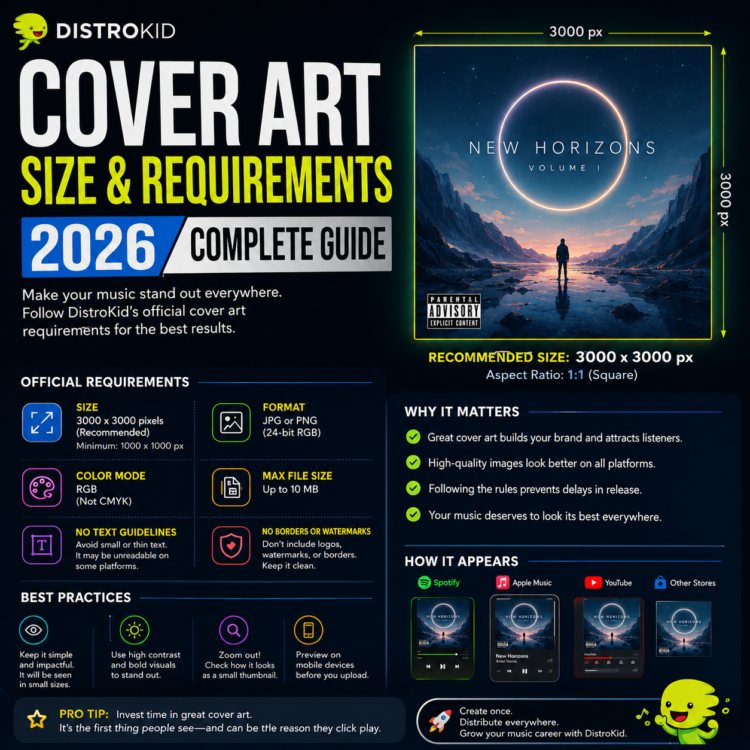
| Requirement | Specification |
|---|---|
| Minimum Size | 3000 x 3000 pixels |
| Maximum Size | 5000 x 5000 pixels (recommended: 3000 x 3000) |
| Aspect Ratio | 1:1 (square only) |
| File Format | JPEG or PNG |
| Color Mode | RGB (not CMYK) |
| Max File Size | 200 MB |
Important: Unlike some platforms that accept a 1400px minimum, DistroKid requires a minimum of 3000 x 3000 pixels. If you upload anything smaller, your release will be rejected before it reaches the stores.
Content Rules for DistroKid Cover Art
Beyond technical specs, DistroKid enforces strict content guidelines that mirror each platform’s policies. Your cover art cannot include:
- Sexually explicit or suggestive imagery
- Contact information (phone numbers, email addresses, URLs)
- Misleading content (e.g., claiming the track is by a famous artist)
- Logos or branding of streaming platforms (Spotify logo, Apple Music logo)
- Copyrighted images used without permission
- QR codes or barcodes
- Blurry, pixelated, or watermarked images
Does DistroKid Reject Cover Art?
Yes — and more often than you’d think. DistroKid has an automated system that reviews artwork before your release goes live. Common rejection reasons include:
- Wrong dimensions: Non-square images or images below 3000px are automatically rejected.
- Wrong color space: CMYK images must be converted to RGB before uploading.
- Prohibited content: Explicit images, contact info, or logos trigger an immediate rejection.
- Low quality: Images that appear blurry or pixelated may be flagged by human reviewers.
If your cover art is rejected, DistroKid will notify you by email, and you’ll need to upload a new version before your release can proceed. This can delay your release by days or even weeks.
How to Prepare Your Cover Art for DistroKid
Follow these steps to ensure your cover art passes DistroKid’s review without issues:
- Create at 3000 x 3000px: Always start with the final output size to avoid upscaling artifacts.
- Export as JPEG or PNG: Use JPEG for photos and complex artwork; PNG for graphics with text.
- Check your color mode: In Photoshop, go to Image → Mode → RGB Color. In Canva, this is automatic.
- Avoid any text near the edges: Keep all important elements within the center 90% of your canvas.
- Do a final quality check: Zoom in to 100% in your editing software to confirm the image is sharp.
DistroKid vs. Direct Platform Upload
When you upload through DistroKid, your cover art gets distributed to Spotify, Apple Music, Amazon Music, Tidal, YouTube Music, and 150+ other platforms simultaneously. Each platform then scales your 3000 x 3000px image down to their display sizes (640px for Spotify album pages, 300px for thumbnails, etc.).
This is why starting at 3000px is non-negotiable — a small image will always look terrible when digital platforms try to display it at varying resolutions.
Get DistroKid-Ready Cover Art Instantly
At Buy Cover Arts, every premade cover artwork is delivered at 3000 x 3000 pixels in RGB JPEG — perfectly optimized for DistroKid, Spotify, Apple Music, and all other platforms. No resizing, no color mode conversion, no technical headaches.
Simply choose your artwork, provide your artist name and track title, and receive your personalized, distribution-ready file within 24 hours.
Frequently Asked Questions
What size does DistroKid require for cover art?
DistroKid requires a minimum of 3000 x 3000 pixels in JPEG or PNG format with RGB color mode and a 1:1 square aspect ratio.
Can I use a PNG file for DistroKid?
Yes, DistroKid accepts both JPEG and PNG. PNG is best for artwork with sharp edges and text; JPEG is better for photographic and painterly styles.
How long does DistroKid cover art review take?
DistroKid’s automated review is usually instant. However, if your artwork is flagged for manual human review, it can take 24–72 hours. Always upload your art well before your release date to avoid delays.