

No products in the cart.
Deezer Cover Art Size 2026: Complete Requirements Guide
17
May
May
Deezer Cover Art Size 2026: Complete Requirements Guide
Uploading music to Deezer requires meeting specific cover art specifications to ensure your artwork looks sharp across all devices and contexts where your music appears. Whether you’re distributing directly through Deezer for Artists or using a distributor like DistroKid, TuneCore, or CD Baby, your cover art must meet Deezer’s requirements to be approved.
This guide covers everything you need to know about Deezer cover art size requirements in 2026, plus best practices for ensuring your artwork looks great on the platform.
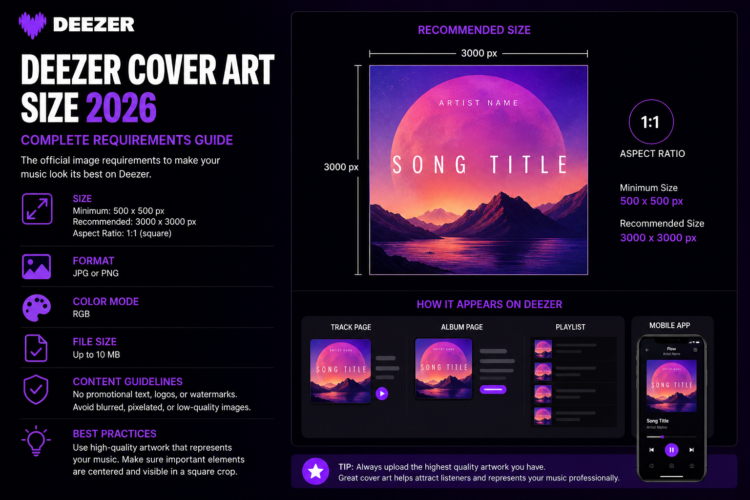
Deezer Cover Art Size Requirements 2026
Deezer’s official cover art specifications are:
- Minimum size: 3000 x 3000 pixels
- Recommended size: 3000 x 3000 pixels or larger
- Aspect ratio: 1:1 (perfect square)
- File format: JPEG or PNG
- Color mode: RGB
- Maximum file size: 10MB
For official Deezer artist documentation, see the Deezer for Artists support page for the most current requirements.
Why Deezer Cover Art Size Matters
Deezer displays your cover art across multiple contexts — album pages, playlist tiles, mobile apps, desktop players, and Smart TV interfaces. Each context renders your cover at different resolutions, from tiny 50×50 pixel thumbnails in search results to full-screen displays on larger devices.
Submitting artwork below 3000 x 3000 pixels risks your music being rejected outright, or appearing blurry and pixelated on high-resolution displays. At 3000 x 3000 pixels, your artwork will look crisp across all current Deezer display contexts.
Can I Use the Same Cover Art for Deezer and Other Platforms?
Yes — Deezer’s requirements are consistent with other major streaming platforms. A single high-resolution cover art file (3000 x 3000 pixels or larger, JPEG or PNG, RGB, 1:1 square) works for Spotify, Apple Music, Amazon Music, Tidal, YouTube Music, and Deezer simultaneously.
This means if you’re using a distributor, you only need to prepare one cover art file for all platforms. See our Album Cover Size Guide 2026 for a complete comparison of requirements across all major streaming services.
Deezer Cover Art Content Restrictions
Beyond technical specifications, Deezer (like all major platforms) has content restrictions for cover artwork:
- No sexually explicit imagery
- No URLs, social media handles, or website addresses in the artwork
- No promotional pricing or commercial messaging in the image
- No unauthorized use of third-party logos or trademarks
- No misleading artist or album information
Violating these content policies will result in your release being rejected during the review process. If distributing via a third party, your distributor will often catch these issues before submission to Deezer.
Deezer for Artists: Direct Submission
Deezer for Artists allows independent musicians to upload music directly to the platform. The upload interface will prompt you to submit cover art during the upload process. Make sure your file meets the minimum 3000 x 3000 pixel requirement before beginning the upload.
If you’re distributing through a third-party distributor, your distributor handles the submission to Deezer. Requirements vary slightly by distributor — check our DistroKid cover art requirements guide if you’re using DistroKid for distribution.
Best Practices for Deezer Cover Art
Beyond meeting minimum technical requirements, great cover art should be designed with streaming platforms in mind. Key best practices include:
- Design at 4000 x 4000 pixels: This future-proofs your artwork for any resolution increases and gives you flexibility for print use.
- Test at small sizes: Check how your cover looks at 50×50 and 100×100 pixels — this is how it appears in playlist views.
- Use high contrast: Strong contrast between elements ensures readability at small sizes.
- Keep text minimal: If you include text, use large, bold fonts that remain readable when the cover is scaled down.
- Avoid fine details near edges: Many display contexts crop or round cover edges; keep important elements centered.
Where to Get High-Quality Cover Art for Deezer
Creating cover art that meets Deezer’s requirements and looks professional can be approached in three ways: hiring a custom designer, creating your own artwork, or purchasing premade cover art.
At Buy Cover Arts, every design is delivered at full resolution (typically 3000 x 3000 pixels or higher), platform-ready for Deezer, Spotify, Apple Music, Amazon Music, and all major distributors. Premade covers offer an affordable, immediate solution with professional quality and commercial rights included.
Browse our Best Premade Album Cover Art by Genre 2026 guide to find the perfect cover art aesthetic for your music style.
Frequently Asked Questions
What is the Deezer cover art size?
Deezer requires cover art to be a minimum of 3000 x 3000 pixels in a 1:1 square format, saved as JPEG or PNG in RGB color mode. Designing at 3000 x 3000 or 4000 x 4000 pixels ensures full compatibility.
Does Deezer accept PNG cover art?
Yes, Deezer accepts both JPEG and PNG files for cover art, provided they meet the minimum size and aspect ratio requirements. JPEG is generally preferred for smaller file sizes with minimal quality loss.
Can I use the same cover art on Deezer and Spotify?
Yes. Both Deezer and Spotify require a minimum of 3000 x 3000 pixels, 1:1 square ratio, JPEG or PNG, RGB color mode. A single high-resolution file works for both platforms simultaneously.
What happens if my Deezer cover art is too small?
If your cover art is below the minimum 3000 x 3000 pixel requirement, Deezer (or your distributor) will reject your release. Always check the pixel dimensions of your cover art file before submitting.
What should my Deezer album cover look like?
Your Deezer cover art should visually represent your music’s genre and mood, use strong contrast for visibility in small sizes, and follow all content guidelines. See our animated album cover art guide if you’re interested in motion artwork for supported contexts.