

No products in the cart.
Album Cover Size Guide 2026: Every Platform, Every Format
17
May
May
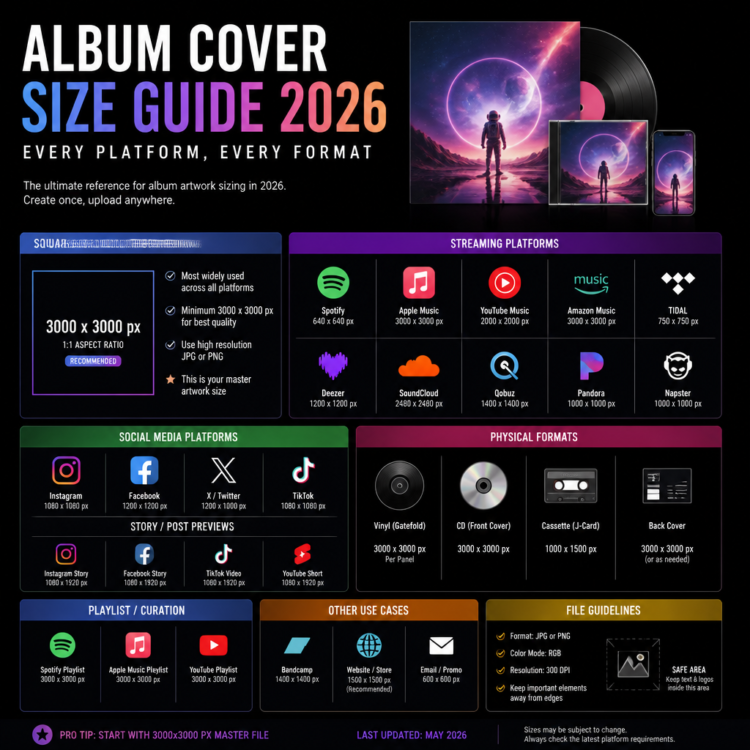
Album Cover Size,The Universal Rule: 3000 x 3000 Pixels
If you remember only one thing from this guide, make it this: your album cover art should be 3000 x 3000 pixels, square (1:1), in JPEG or PNG format, RGB color mode. This single specification works across every major music streaming platform in the world.
The reason all platforms have converged on this standard is resolution independence. A 3000px image scales down beautifully to any display size — from a 40px thumbnail in a Now Playing bar to a full-screen display on a 4K television. Going smaller means your art looks blurry at large sizes. Going larger wastes storage without visual benefit.
Album Cover Size by Platform (2025)
| Platform | Required Size | Format | Notes |
|---|---|---|---|
| Spotify | 3000 x 3000 px (min. 1400) | JPEG/PNG | RGB only |
| Apple Music | 3000 x 3000 px | JPEG/PNG | RGB, no transparency |
| Amazon Music | 3000 x 3000 px | JPEG | RGB color mode |
| YouTube Music | 3000 x 3000 px | JPEG/PNG | Square only |
| Tidal | 3000 x 3000 px | JPEG/PNG | High fidelity standard |
| Deezer | 3000 x 3000 px (min. 500) | JPEG/PNG | Square required |
| SoundCloud | 3000 x 3000 px (min. 800) | JPEG/PNG | Max 10 MB file size |
| Bandcamp | 3000 x 3000 px (min. 350) | JPEG/PNG | No maximum size |
| Napster | 3000 x 3000 px | JPEG | RGB only |
| DistroKid | 3000 x 3000 px (required) | JPEG/PNG | Strictest enforcement |
| TuneCore | 3000 x 3000 px | JPEG/PNG | Standard industry spec |
| CD Baby | 3000 x 3000 px | JPEG/PNG | RGB, no borders |
How Platforms Actually Display Your Cover Art
Although you upload at 3000px, platforms display your artwork at much smaller sizes depending on context. Here’s how Spotify, the world’s largest streaming platform, uses your cover art across its interface:
- Search results thumbnail: ~40 x 40 px
- Album listing on artist page: ~130 x 130 px
- Now Playing bar: ~40–56 px
- Full Now Playing view: ~640 x 640 px
- Desktop album page: ~232 x 232 px
This is why uploading at 3000px is so important — the platform handles all the downscaling, and a high-resolution source means every display size looks sharp and professional.
Physical Format Album Cover Sizes
If you’re releasing a physical product alongside your digital release, the sizing requirements are different and DPI (dots per inch) becomes critical:
| Format | Dimensions | DPI | Notes |
|---|---|---|---|
| CD Jewel Case Front | 4.724 x 4.724 in (12 x 12 cm) | 300 DPI | 1417 x 1417 px at 300dpi |
| CD Digipak | 4.724 x 4.724 in | 300 DPI | Same as jewel case |
| 12″ Vinyl (LP) | 12.375 x 12.375 in | 300 DPI | 3713 x 3713 px at 300dpi |
| 7″ Vinyl (Single) | 7 x 7 in | 300 DPI | 2100 x 2100 px at 300dpi |
| Cassette Cover | 2.75 x 2.75 in | 300 DPI | 825 x 825 px at 300dpi |
Key difference for print: Physical formats require 300 DPI minimum (preferably 350+ DPI for premium printing) and use CMYK color mode, not RGB. Always check with your printer for their specific bleed and safe zone requirements.
Album Cover Color Modes: RGB vs CMYK
This is one of the most common technical mistakes artists make:
- Digital / Streaming (Spotify, Apple Music, etc.): Always use RGB. If you upload a CMYK file, the colors will look washed out and dull on screen, and many platforms will reject the file entirely.
- Print (CD, Vinyl, Merch): Always use CMYK (or Pantone for specific color matching). RGB colors print unpredictably, and your bright reds may come out orange or muddy.
The safest workflow is to design in RGB first for digital releases, then create a CMYK conversion specifically for print production.
Quick Checklist Before Uploading Your Album Art
- ✅ Image is exactly 3000 x 3000 pixels (or larger)
- ✅ Aspect ratio is 1:1 (perfect square)
- ✅ File is saved as JPEG or PNG
- ✅ Color mode is RGB (not CMYK)
- ✅ File size is under 200 MB
- ✅ No blurriness, pixelation, or watermarks
- ✅ No prohibited content (logos, URLs, explicit material)
- ✅ Text and important elements are at least 5% away from all edges
Get Platform-Ready Cover Art Without the Hassle
Every cover art at Buy Cover Arts is designed and delivered at 3000 x 3000 pixels, RGB JPEG — the universal standard that works on Spotify, Apple Music, DistroKid, TuneCore, Bandcamp, and every other platform without any adjustments. Browse 300+ professional premade designs across every genre.