
No products in the cart.
How to Make Album Cover Art in 2026: DIY vs Premade vs Custom
17
May
May
Why Cover Art Still Matters in 2026
In the streaming era, your album cover art is your music’s primary marketing asset. It’s the first thing listeners see on Spotify, Apple Music, YouTube Music, and every other platform. A professional, genre-appropriate cover dramatically increases click-through rates, improves playlist placement opportunities, and signals credibility to both listeners and curators.
In 2026, independent artists have more options than ever for getting high-quality cover art. This guide breaks down all three main approaches — DIY, premade, and custom — so you can choose the right one for your release.
Option 1: DIY Cover Art (Design It Yourself)
The DIY approach means creating your own artwork using design software. The most popular tools for DIY cover art in 2026 are Canva, Adobe Photoshop, Adobe Illustrator, and Affinity Designer.
- Canva: Browser-based, beginner-friendly, free tier available. Good for simple designs but limited for complex illustration
- Adobe Photoshop: Industry standard for photo manipulation. Steep learning curve but most powerful for photographic artwork
- Adobe Illustrator: Best for vector-based designs and typography
- Affinity Designer: One-time purchase alternative to Adobe tools. Excellent value
Technical requirements: minimum 3000x3000px, 1:1 square ratio, RGB color mode, JPEG or PNG. No URLs, social handles, or third-party logos.
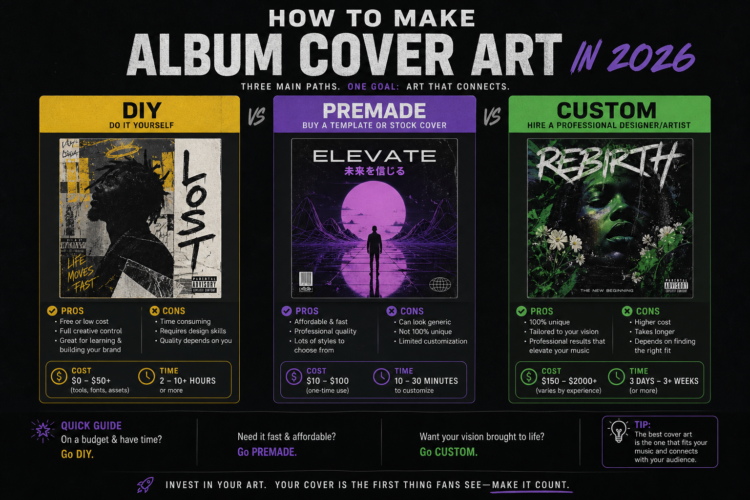
Cost: Free to $60/year | Time: 2–20+ hours | Best for: Artists with strong design skills
Option 2: Premade Cover Art (Buy Ready-Made)
Premade cover art is professionally designed artwork available for immediate purchase and download. Designers create these across different genres and styles, and artists can license them for their releases.
- Instant availability: Download immediately after purchase — no waiting
- Professional quality: Created by specialist designers, market-tested for streaming platforms
- Affordable: $39–$120 for exclusive licenses (vs $150–$500+ for custom)
- Platform-ready: Delivered at 3000x3000px or higher, RGB, ready to upload
- Genre-specific: Organized by genre so you find artwork that matches your sound
Cost: $39–$120 | Time: Minutes | Best for: Independent artists who need professional artwork quickly and affordably
Browse premade designs by genre at Buy Cover Arts — every design delivered at full resolution, platform-ready. Our Best Premade Album Cover Art by Genre guide helps you find the right visual style for your music.
Option 3: Custom Cover Art (Commission a Designer)
Custom cover art is artwork created from scratch specifically for your release by a professional designer. This is the most expensive and time-consuming option, but offers complete creative control and guaranteed uniqueness.
- Fiverr: Wide range of designers at varying price points ($25–$200+)
- 99designs: Design contests or direct designer selection ($150–$500+)
- Dribbble/Behance: Browse professional designer portfolios and reach out directly
Cost: $150–$500+ | Time: 3–14 days | Best for: Major releases where budget isn’t a constraint and complete uniqueness is essential
DIY vs Premade vs Custom: Which Should You Choose?
- DIY: Best if you have strong design skills and time. Worst option if you don’t — poor DIY artwork actively damages your release’s credibility
- Premade: Best for most independent releases — professional quality, immediate availability, affordable pricing
- Custom: Best for album-level releases where you have the budget and want completely unique artwork
Step-by-Step: How to Make DIY Album Cover Art with Canva
- Open Canva and create a new design — select “Custom dimensions” and enter 3000 x 3000 pixels
- Choose a background: solid color, gradient, or upload a photo
- Add visual elements that reflect your music’s mood and genre
- Add text: your artist name and release title, using fonts that match your genre
- Review at thumbnail size: zoom out to see how it looks at 100x100px — if not readable, simplify
- Export as PNG or JPEG at maximum quality, in RGB color mode
Album Cover Art Technical Checklist
- Dimensions are at least 3000 x 3000 pixels (4000 x 4000 for Apple Music)
- Color mode is RGB, not CMYK
- File format is JPEG or PNG
- No URLs, social media handles, or streaming platform logos
- No blurriness or pixelation at 100% zoom
- Design is recognizable at thumbnail size (50px wide)
- Aspect ratio is exactly 1:1 (perfect square)
For a complete platform-by-platform breakdown of specifications, see our Album Cover Size Guide for 2026.
Frequently Asked Questions
Can I make album cover art for free?
Yes. Canva’s free tier offers basic design tools suitable for simple cover art. However, truly professional-looking results typically require either design skills, a paid tool, or purchasing premade artwork.
How long does it take to make album cover art?
DIY takes 2–20+ hours depending on skill level. Custom design from a professional takes 3–14 days. Premade cover art is available for immediate download — minutes from decision to finished file.
Can I use AI to generate album cover art?
AI image generators can create interesting starting points, but they often require significant editing and may have licensing issues. They also lack the genre-specific expertise and platform optimization that professional premade cover art provides.