

No products in the cart.
Apple Music Cover Art Size 2026: Complete Requirements Guide
17
May
May
What Is the Apple Music Cover Art Size?
If you’re releasing music on Apple Music, getting your cover art size right is not optional — it’s required. Apple Music has strict upload requirements, and submitting artwork that doesn’t meet the specifications will result in your release being rejected by your distributor.
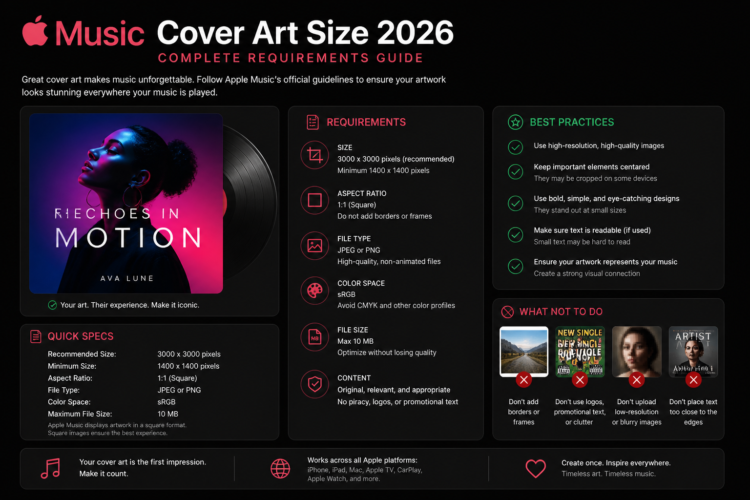
The recommended Apple Music cover art size is 4000 x 4000 pixels, with a 1:1 square aspect ratio. This is the highest standard in the streaming industry, and designing at this resolution ensures your artwork looks sharp on every device — from a tiny iPhone thumbnail to a full-screen Apple TV display.
Apple Music Cover Art Requirements (2026)
Here is a full breakdown of the technical requirements for Apple Music cover art in 2026:
- Dimensions: 4000 x 4000 pixels (minimum 3000 x 3000 px accepted by most distributors)
- Aspect Ratio: 1:1 (perfect square)
- File Format: JPEG, PNG, TIFF, or GIF
- Color Mode: RGB (not CMYK)
- Resolution: 72 DPI minimum (300 DPI recommended for best quality)
- Maximum File Size: 50 MB
- No blurriness or pixelation
- No explicit content visible in the artwork (unless flagged as explicit)
- No website URLs or social media handles in the artwork
- No third-party logos (Spotify, YouTube, etc.) visible in the image
According to the official Apple Music for Artists support documentation, these specifications are enforced at the distributor level, meaning your distributor (DistroKid, TuneCore, CD Baby, etc.) will reject non-compliant artwork before it ever reaches Apple’s servers.
Why Does Apple Music Require 4000 x 4000 Pixels?
Apple Music displays artwork across a wide range of screen resolutions — from the tiny 44px thumbnail inside the Now Playing bar to a full-resolution 4K display on Apple TV. By requiring a 4000 x 4000 pixel source image, Apple ensures that no matter how your artwork is scaled, it retains its visual quality.
Submitting artwork below the recommended resolution risks your cover art appearing blurry or pixelated on high-resolution displays, which directly affects how listeners perceive your music. First impressions matter — and your cover art is often the very first one.
Common Apple Music Cover Art Mistakes to Avoid
Many independent artists get their releases rejected or end up with poor-quality artwork on Apple Music due to avoidable errors. Here are the most common mistakes:
- Designing in CMYK instead of RGB — colors will appear dull and washed out on digital screens
- Uploading a low-resolution image and scaling it up — upscaling destroys image quality
- Adding social media handles or URLs directly on the artwork — this violates Apple’s content policy
- Using a non-square image — any crop or padding to make it square will be visible and look unprofessional
- Saving as CMYK JPEG — always convert to RGB before exporting
How to Check Your Cover Art Before Uploading
Before submitting your release, run through this quick checklist to make sure your Apple Music cover art is ready:
- Open the file in Photoshop or any image editor and confirm the dimensions are at least 3000 x 3000 px (ideally 4000 x 4000 px)
- Check that the color mode is set to RGB, not CMYK
- Zoom in at 100% to check for blurriness or pixelation
- Confirm no URLs, social handles, or third-party logos are visible
- Make sure the image is a perfect square (no white bars, no padding)
Apple Music vs Other Streaming Platforms: Size Comparison
Understanding how Apple Music’s requirements compare to other platforms helps you design a single master file that works everywhere:
- Apple Music: 4000 x 4000 px recommended
- Spotify: 3000 x 3000 px recommended
- Tidal: 1600 x 1600 px minimum (3000 recommended)
- Amazon Music: 1600 x 1600 px minimum
- SoundCloud: 800 x 800 px minimum (3000 recommended)
this is The best approach is to always design at 4000 x 4000 pixels — Apple Music’s highest standard. This single file will be accepted by every streaming platform, saving you time and ensuring consistency across all your releases.
Getting Professional Cover Art for Apple Music
For independent artists, creating high-quality cover art that meets Apple Music’s technical requirements can be challenging — especially if you don’t have design experience. There are three main options:
- DIY with Canva or Photoshop: Free or low-cost, but time-consuming and requires design skills
- Hire a custom designer: Professional results, but expensive ($150–$500+) and takes days or weeks
- Buy premade cover art: Instantly available, professionally designed, and delivered at the correct resolution for all platforms
Premade cover art is the fastest way to get platform-ready artwork without the design hassle. Every design in our Buy Cover Arts shop is delivered at 4000 x 4000 pixels in RGB format — fully compliant with Apple Music, Spotify, DistroKid, and every major distributor.
You can also browse our Best Premade Album Cover Art by Genre guide to find the perfect style for your music, or check the complete Album Cover Size Guide for a full breakdown of every platform’s requirements in one place.
Frequently Asked Questions
What is the minimum cover art size for Apple Music cover art size?
Most distributors require a minimum of 3000 x 3000 pixels to submit to Apple Music. However, Apple’s own recommended size is 4000 x 4000 pixels for the best quality across all displays.
Can I use a PNG file for Apple Music cover art size?
Yes. Apple Music accepts JPEG, PNG, TIFF, and GIF formats. JPEG is the most commonly used format due to its smaller file size, but PNG is also fully supported.
Does Apple Music cover art size need to be square?
Yes. All Apple Music cover art must be a perfect square with a 1:1 aspect ratio. Non-square images will be rejected by your distributor.
What happens if I submit low-resolution artwork?
If your artwork is below the minimum resolution (typically 3000 x 3000 px), your distributor will reject the submission and ask you to resubmit with compliant artwork before your release can go live.