
No products in the cart.
Spotify Cover Art Size 2026: Complete Requirements Guide
17
May
May
What Is the Correct Spotify Cover Art Size?
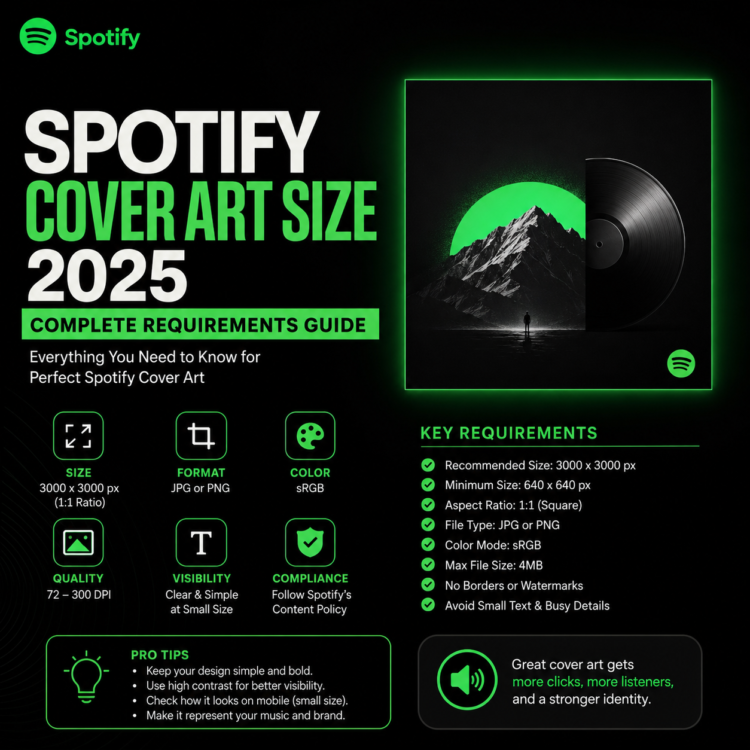
Spotify requires your album cover art to be exactly 3000 x 3000 pixels — that’s a perfect square with a 1:1 aspect ratio. The minimum accepted size is 1400 x 1400 pixels, but uploading at 3000 x 3000 ensures your artwork looks sharp on every screen, from a phone to a smart TV.
Spotify Cover Art Requirements at a Glance
| Requirement | Specification |
|---|---|
| Dimensions | 3000 x 3000 px (minimum: 1400 x 1400 px) |
| Aspect Ratio | 1:1 (square) |
| File Format | JPEG or PNG |
| Color Mode | RGB |
| Max File Size | 200 MB |
| DPI | 72 DPI minimum |
Why Does Size Matter on Spotify?
Spotify displays your cover art in multiple sizes across its interface — from tiny 40px thumbnails in the “Now Playing” bar to large 640px versions on album pages. If your image is too small or low-resolution, it will appear blurry and pixelated, which instantly damages your credibility as an artist.
More importantly, your cover art is the first visual impression listeners have of your music. A professional, high-quality cover art has been shown to increase playlist adds, stream counts, and listener retention.
What File Format Should You Use?
Spotify accepts both JPEG and PNG formats. JPEG is recommended for most artwork because it compresses well and keeps file sizes manageable. Use PNG only if your artwork has transparent backgrounds or very sharp text elements that require lossless compression.
Avoid using GIF or WebP formats — Spotify will reject these files during the upload process.
Common Spotify Cover Art Mistakes to Avoid
- Uploading too small: Anything under 1400px will be rejected outright by Spotify.
- Using non-square images: Spotify only accepts 1:1 ratio. Rectangles will be cropped or rejected.
- Low resolution scans: If you’re photographing physical artwork, scan at 300+ DPI and then export at 3000px.
- Text too close to edges: Always leave a 5% safe zone margin around your artwork so text isn’t cut off.
- Copyrighted images: Using stock photos or famous artworks without a license can get your music removed from Spotify.
How to Resize Your Cover Art for Spotify
If you’re using Adobe Photoshop, go to Image → Image Size and set both Width and Height to 3000 pixels at 72 DPI. In Canva, create a new design with custom dimensions of 3000 x 3000px. In GIMP, use Image → Scale Image and set dimensions accordingly.
Always maintain the original aspect ratio when resizing to avoid stretching or distorting your artwork.
Save Time with Premade Album Cover Art
Creating a professional album cover from scratch takes significant time and design skills. At Buy Cover Arts, all our premade cover artworks are delivered at full Spotify-ready resolution — 3000 x 3000 pixels in RGB JPEG format. You simply purchase, fill in your artist name and track title, and receive a ready-to-upload file within 24 hours.
Browse our collection of 300+ premade cover arts across genres including Dark, Electronic, Metal, Psychedelic, Hip-Hop, and more — all perfectly sized for Spotify, Apple Music, DistroKid, and every major platform.
Frequently Asked Questions
Can I use a rectangular image on Spotify?
No. Spotify strictly requires a square (1:1) aspect ratio. Any non-square image will either be rejected or automatically cropped, which may cut off important parts of your artwork.
What happens if my cover art is too small?
If your image is under 1400 x 1400 pixels, Spotify (and most distributors like DistroKid, TuneCore, CD Baby) will reject your upload with an error message. Always aim for 3000 x 3000px to be safe.
Does Spotify have rules about what can appear in cover art?
Yes. Spotify’s content policies prohibit cover art that contains explicit sexual content, misleading information, or violates copyright. Always use original artwork or properly licensed designs.